


You’ve been careful with money your whole life. Here’s the one thing that catches careful people out.

By Elizabeth Ndungu | Founder, Ndungu Consulting | Tech Coach for Adults 50+
Here is something most people do not tell you about mobile banking safety.
The biggest risk is usually not the banking app.
The biggest risk is being tricked into leaving the banking app.
That single fact changes everything about how you think about mobile banking safety. And it is why so many careful, intelligent adults over 50 are still at risk. Not because they are careless, but because this idea may not have been explained properly.
That is what I want to do here.
What Makes the App Safer Than You Think
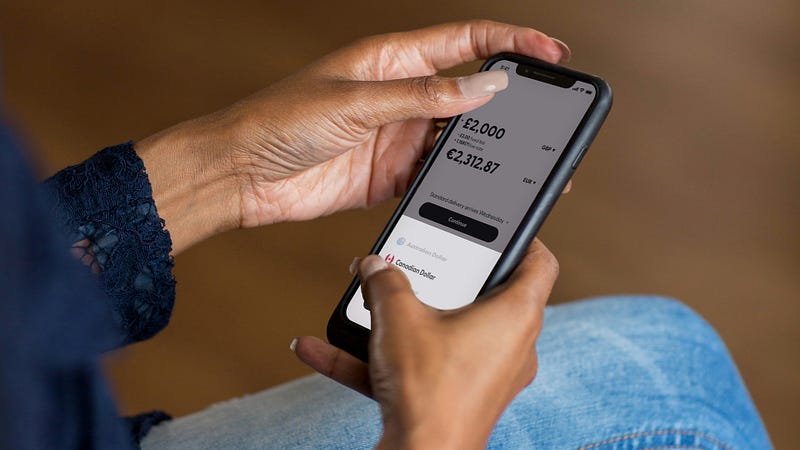
Banks spend a lot on security. Their apps use encryption, which scrambles your data while it travels between your phone and the bank.
They also require more than just a password to log in. You may need a code sent to your phone, your fingerprint, or face recognition.
In many cases, the banking app is one of the safest ways to access your account.
Safer than clicking a link in an email.
Safer than calling a number you found on Google.
Safer than using a browser on a public computer.
When you open your bank’s official app directly from your phone, you are going through the bank’s own system. That is a very different thing from following a link to what looks like the bank.
And that difference matters.
The One Rule That Protects You From Most Scams
Because those banking apps are safer, scammers had to find a different way to get to you and your details.
They try to pull you away from the official app.
Before, scams were easier to spot. Odd grammar. Spelling errors. Something that felt slightly off.
That is no longer reliable.
A 2025 Pew Research Center survey found that 61% of U.S. adults receive scam text messages at least weekly. So if you feel like these messages are showing up more often, you are not imagining it.
The FDIC has specifically warned about bank impersonation scams, where someone posing as your bank contacts you and asks for your account details, card numbers, or passwords. That is the goal: to get you to hand over the information yourself.
AI has made scam messages harder to spot. Messages can now sound polished, professional, and completely convincing. A message might say your account has been locked. Or that suspicious activity was detected. Or that you need to verify your information immediately.
It may look exactly like something your bank would send.
It may have your bank’s logo.
It may address you by name.
Then it gives you a link.
If you click that link and enter your login details, you have not logged into your bank. You have handed your information directly to someone pretending to be your bank.
This is why the rule is simple:
Please.
Let me repeat that.
Never log in to your bank by clicking a link in a text or email.
There is one important exception.
If you started the process yourself through the official banking app or website, and it tells you to check your email for a password reset link, that is different. In that case, you began the transaction.
But if a random text or email arrives and tells you to click a link to fix a banking problem, do not use that link.
No matter how official it looks.
No matter how urgent it sounds.
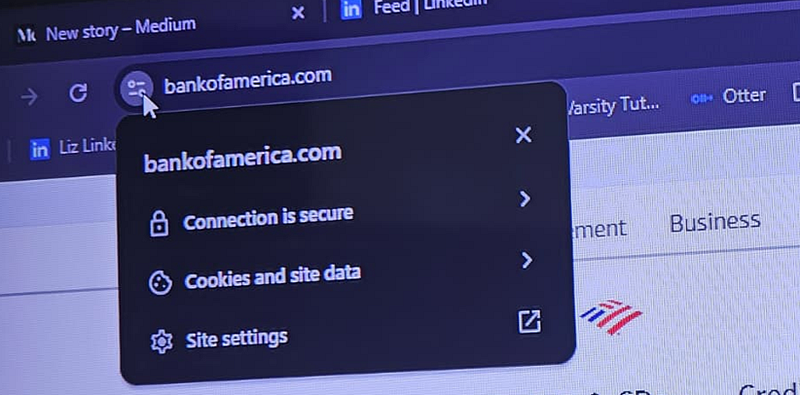
Always open the banking app yourself. Or type your bank’s website address into the browser yourself.
Check if the connection to the website is secure (see below).
If someone calls and says they are from your bank, hang up. Then call the number printed on the back of your card.
A real bank will understand.
A scammer will pressure you to stay on the line.
That pressure is the warning sign.
What About Public Wi-Fi?

As a simple safety habit, avoid doing your banking on public Wi-Fi.
Coffee shops, airports, hotel lobbies, libraries, and other shared networks are not the best place to handle financial information.
If you need to check your account when you are out, switch off the Wi-Fi on your phone and use your mobile data connection instead.
It takes a few seconds.
It is worth doing.
Michael’s Story

Name changed for privacy.
Sometimes people come to me because they want to learn technology.
Other times, they come because something in life has changed, and now they have to do things online that someone else used to handle.
That was Michael.
He did not come to me because he wanted to become good with technology.
He came because his life had changed.
His marriage had ended unexpectedly. Like many couples, he and his wife had divided responsibilities in a way that made sense over the years.
He handled the house. The repairs. The yard. The things that needed tools and physical work.
She handled the bills. The online banking. The automatic payments. The passwords. The accounts.
Then suddenly, she was gone.
And everything that had quietly been running in the background was now sitting in front of him.
The electric bill.
The mortgage.
The bank account.
The phone app.
The automatic payments he did not even know existed.
When he first reached out, he was not simply asking for a technology lesson.
He was trying to keep his life from falling apart.
He did not know how to use a computer comfortably. He did not know which messages from the bank were real and which ones could be scams. He did not know what had been paid, what still needed attention, or how to check.
And underneath all of that was something I see often.
Embarrassment.
Not because he had done anything wrong.
But because he felt he should already know.
That is one of the hardest parts of working with adults on technology.
The fear is rarely about the button.
It is about what the button represents.
A missed payment.
A scam.
A mistake.
A reminder that life has changed.
So we did not rush.
We started with how to open the computer. How to find the bank website safely. How to tell a real site from a fake one. How to log in without clicking a link. How to read a transaction. How to understand what an automatic payment means.
No jargon.
No shame.
No assumption that he should already know.
Just one step, then the next.
What I remember most is how quickly his confidence came back once someone explained things plainly.
The technology was not the real problem.
The lack of guidance was.
Over time, Michael learned to check his accounts, review his bills, understand his automatic payments, and recognize when something did not look right.
Learning online banking did not fix the pain of divorce. It did not make the loneliness disappear.
But it gave him one thing back.
A sense of control.
And sometimes, when someone is rebuilding their life, one area of control matters more than people realize.
When Someone You Love Needs Help

If Michael’s story reminded you of someone, pay attention to that feeling.
Maybe it is your father. Your mother. A sibling. A friend who recently lost a spouse. Someone who went through a divorce. Someone who retired and now has to manage more things online than they expected.
They may not say, “I need help with technology.”
They may say:
“I don’t trust that thing.”
“I’m scared I’ll press the wrong button.”
“I’ll just go to the bank in person.”
“I’m too old for this.”
But often, what they really mean is:
I need someone to teach me without making me feel embarrassed.
That is exactly the kind of help I provide. I work one-on-one with adults who want calm, practical guidance with everyday technology, without jargon, without pressure, and without anyone making them feel small for asking.
If that sounds like what you or someone you love needs, you can find me at ndunguconsulting.com.

The Real Issue has never been about your Intelligence
Your financial instincts still matter.
Your habit of reading things carefully still matters.
Your caution with money still matters.
Those things do not disappear because banking moved to a phone.
The tools are different.
The principles are not.
Most adults over 50 are not struggling with technology because they cannot learn. They are struggling because the world changed quickly, and nobody paused long enough to teach them.
Banks closed branches. Bills moved online. Appointments moved to apps. Passwords became part of everyday life. People were expected to keep up on their own.
That is not a fair way to learn.
One Final Thing

If you take nothing else from this article, take this:
Do not click the banking link.
Open the app yourself.Write it on a sticky note if you need to. Keep it near your phone.I have had clients do exactly that.I support it completely.There is no shame in reminders. The goal is not to look like you know everything. The goal is to protect yourself.
About the Author:
 Elizabeth Ndungu is the founder of Ndungu Consulting, a technology coaching and digital literacy practice that helps adults over 50 build confidence with computers, phones, online banking, email, Microsoft Office, and everyday technology. She provides patient, plain-English computer training for older adults who want to learn without jargon, pressure, or embarrassment.
The Basic Computer Skills Guide, a plain-English guide for adults who want to feel more capable with modern technology, is available here: https://elizabethw2.gumroad.com/l/basiccomputerguide
Sources:
Pew Research Center, “Online Scams and Attacks in America Today,” July 31, 2025: https://www.pewresearch.org/internet/2025/07/31/online-scams-and-attacks-in-america-today/
FDIC Consumer News, “Bank Impersonation Scams and Fake Banks,” June 18, 2025: https://www.fdic.gov/consumer-resource-center/2025-06/bank-impersonation-scams-and-fake-banks
Tags: Mobile Banking Safety | Online Banking | Digital Literacy | Adults Over 50 | Computer Training | Technology Coaching | Online Scams | Banking Scams | Basic Computer Skills | Ndungu Consulting
Leave a Reply